
Cloud Migration
The Hidden Complexity of Enterprise Storage Migration: Mapping SAN to Cloud
Most cloud migrations move VMware datastores and call it done. For enterprises still running traditional SAN storage, the real complexity starts a layer below the VM — and it's rarely accounted for in migration plans.
Introduction
Most cloud migration conversations focus on virtual machines. Discover the VMs, assess the operating systems, move the workloads, validate, done.
For a large share of enterprises, that story is accurate. Modern virtualized environments running on VMware datastores or similar abstractions migrate in a relatively predictable way.
But for many large enterprises — particularly banks, insurers, and other institutions with decades of infrastructure investment — a significant portion of mission-critical data does not live on simple virtual disks. It lives on traditional SAN-attached storage arrays, accessed through Fibre Channel fabrics, governed by host-to-storage mappings that were built up, array by array, over many years.
For these environments, migration planning cannot stop at the VM layer. It has to go one level deeper.
Why SAN Storage Breaks the Simple Migration Model
A virtual machine on SAN-attached storage is not a self-contained unit. It depends on a chain of relationships that sits entirely outside the hypervisor.

Every link in that chain matters. The server doesn’t “own” its data the way it would with local or simple virtual disks — it reaches out across a fabric to a storage array that may be shared across hundreds of other hosts, applications, and business units.
Move the VM without understanding this chain, and one of two things tends to happen: the data doesn’t come with it, or — worse — the migration quietly breaks something else that was sharing the same storage infrastructure.
The Mapping Problem
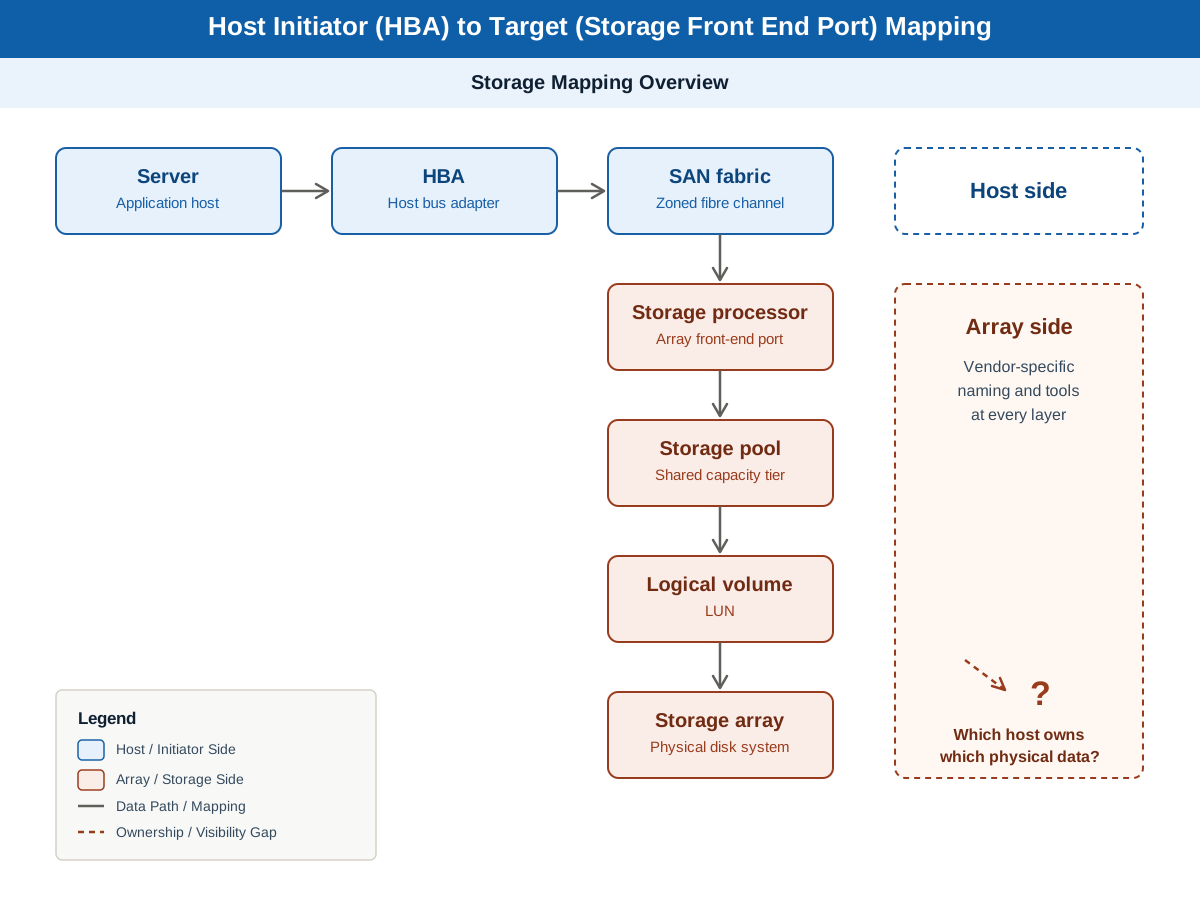
At the center of this complexity is a deceptively simple question: which server is actually talking to which piece of physical storage?
Answering it requires tracing the relationship between a host’s HBA identifiers, the SAN fabric paths those identifiers are zoned through, the storage array’s front-end ports, and finally the specific storage pool and logical volume the data lives on.
In most enterprises, this mapping exists — but not in one place. It’s split across array management consoles, fabric switch configurations, and SAN documentation maintained by different teams, often using different naming conventions and different tools depending on which storage platform was purchased and when.
A storage estate built up over fifteen or twenty years rarely has a single, current, accurate map of host-to-storage relationships. It has fragments.
What a Migration Plan Actually Needs to Know
Before any SAN-attached data can move — whether to the cloud, to a new array, or to a consolidated platform — a migration plan needs clear answers to a set of questions:
- Which hosts are connected to which storage arrays, and through which fabric paths
- Which logical volumes belong to which application or business service
- Which storage pools are shared across multiple workloads, and what the blast radius is if one of them moves
- Which dependencies exist between storage-level relationships and the application dependencies already mapped earlier in the migration process
- What the cutover sequencing needs to look like so that storage relationships and compute relationships move together, not separately
None of these questions have a generic answer. Every enterprise’s storage estate has its own history, its own mix of vendors and platforms, and its own undocumented exceptions.
Where This Fits in the Migration Workflow
This work sits squarely inside the Discovery & Assessment phase of a migration program, and it directly informs Architecture & Design and Move Group planning downstream. It is, in many ways, the storage-layer equivalent of application dependency mapping — except that where application dependencies are observed through network traffic, storage dependencies have to be reconstructed from infrastructure-level mapping data that often isn’t centralized anywhere.
Skip this step, and move group plans built purely on application and network dependencies will be incomplete. A workload can be perfectly understood at the application layer and still fail during cutover because of a storage relationship nobody mapped.
Why This Is an Intelligence Problem
The instinct is to treat this as a documentation exercise — pull reports from each storage array, stitch them together in a spreadsheet, and call it a mapping. In practice, that approach breaks down quickly. Storage estates are large, the source data is inconsistent across platforms, and the relationships that matter most are the ones connecting storage data back to applications and business services — which rarely exists in any single export.
This is where a structured, AI-assisted intelligence layer changes the equation: ingesting data from multiple storage and fabric sources, normalizing it into a common model, and reasoning across host, fabric, and storage relationships to produce a mapping that is actually usable for migration planning — rather than a pile of exports that still need to be manually reconciled.
This is one of the assessment capabilities VScalar provides as part of cloud migration engagements: building the storage-to-host mapping picture before any data movement is planned, so that move group design and cutover sequencing are built on a complete picture, not just the application and compute layer.
Closing
VM-level discovery answers the easy part of the migration question. For enterprises with significant SAN-attached storage, the harder and more consequential question is what’s underneath the VM — and that question has to be answered before a single byte of data moves.
In the next post, we’ll look at the migration strategy questions that come after the mapping is done — including the often-overlooked cost dynamics of moving large data volumes between on-premises environments and the cloud, and between cloud providers.